
If you have ever searched “how much is a golf simulator,” you probably noticed the same thing I did: the price range is all over the place.
Some setups seem to start around a few thousand dollars, while others quickly climb past $20,000, $30,000, or even more. At first, I thought the launch monitor was the main cost. But once I started seriously planning a home simulator, I realized the real cost comes from the complete system: the launch monitor, screen, enclosure, projector, mat, software, PC, and all the smaller pieces that make the setup actually work.
I live in Buffalo, New York, where the outdoor golf season can feel painfully short. I wanted a home simulator mainly so I could keep practicing through winter, maintain my distances, and stop feeling like I had to rebuild my swing every spring.
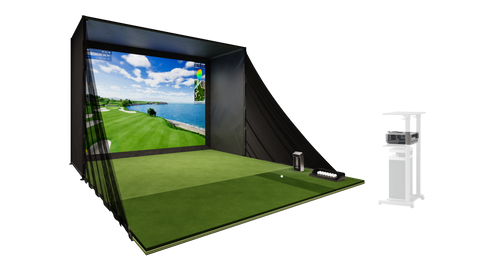
After comparing different systems and pricing out the components separately, I ended up buying the GOLFJOY P8 home simulator package. It cost $8,199 and gave me a complete setup instead of forcing me to source every major component one by one.
So, How Much Does a Golf Simulator Actually Cost?
A realistic home golf simulator usually costs anywhere from about $3,000 to $20,000+, depending on the launch monitor, screen quality, projector, enclosure size, software, and whether you build it piece by piece or buy a complete package.
For a serious home golfer who wants reliable data, real simulator gameplay, and a setup that feels durable enough for long-term use, the realistic range is usually closer to $7,000 to $15,000.
The biggest mistake I made early in the research process was thinking only about the launch monitor price. In reality, the launch monitor is just the beginning.
What Actually Makes Up the Cost of a Golf Simulator?
A full home golf simulator usually includes the following major components:
- Launch monitor
- Impact screen
- Enclosure or safety netting
- Projector
- Hitting mat
- Simulator software
- Gaming PC or compatible device
- Flooring, cables, mounts, and setup accessories
Once I added these together, I understood why simulator pricing can feel confusing. A launch monitor may look reasonable by itself, but the full simulator environment around it can easily double the total cost.
The Cost of a Golf Launch Monitor: Around $600 to $25,000+
The launch monitor is the core of the simulator. It measures the golf ball, club movement, launch conditions, spin, carry distance, and shot direction. If this part is inaccurate, the rest of the simulator does not really matter.
Entry-level launch monitors can start around $600 to $1,000. These can be useful for casual practice, but they usually provide limited data and may rely more heavily on estimated numbers, especially indoors.
More serious home simulator launch monitors usually fall into the $2,000 to $7,000 range. This is where you start seeing stronger indoor performance, better spin tracking, GSPro compatibility, touchscreen displays, and more advanced ball and club data.
Professional or commercial-grade systems can go from $10,000 to $25,000+, especially when you get into high-end overhead systems or tour-level radar units.
Why I Focused on Camera-Based Launch Monitors
Because my simulator would mostly be used indoors, I focused heavily on camera-based systems. Radar-based systems can work very well outdoors, but indoors they often need more ball flight distance to calculate trajectory accurately.
Camera-based launch monitors measure impact conditions more directly, which makes them especially useful for garage and home simulator spaces.
During my research, I looked closely at Bushnell Launch Pro, Uneekor Eye Mini, Foresight GC3, Garmin R50, and GOLFJOY Spica 3.
I was originally focused on Bushnell and Uneekor because they were within the range I was considering. But once I looked deeper, I realized some systems required additional yearly software subscriptions or connection fees to fully use GSPro. That changed the way I looked at long-term cost.
Where GOLFJOY Spica 3 Stood Out
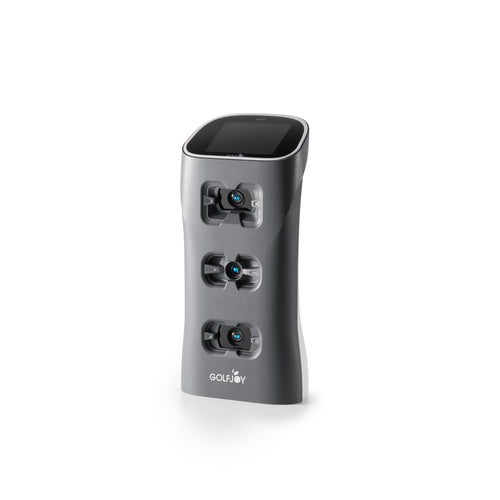
The GOLFJOY Spica 3 stood out because it combined a triple high-speed camera system, 29 data points, GSPro compatibility, no third-party connection fee, a built-in touchscreen, and support for standard golf balls.
It did not feel like I was choosing it because I wanted to compromise. It felt more like I was choosing a system with strong indoor performance, practical usability, and a cleaner long-term ownership structure.
The Cost of Golf Simulator Software: $0 to $2,000+ Per Year
Software is where simulator costs can get more complicated.
Some launch monitors include basic software. Others require annual subscriptions to unlock simulator play, club data, advanced features, or third-party software connections.
Popular simulator software options include GSPro, E6 Connect, Creative Golf, FSX Play, and brand-native software platforms.
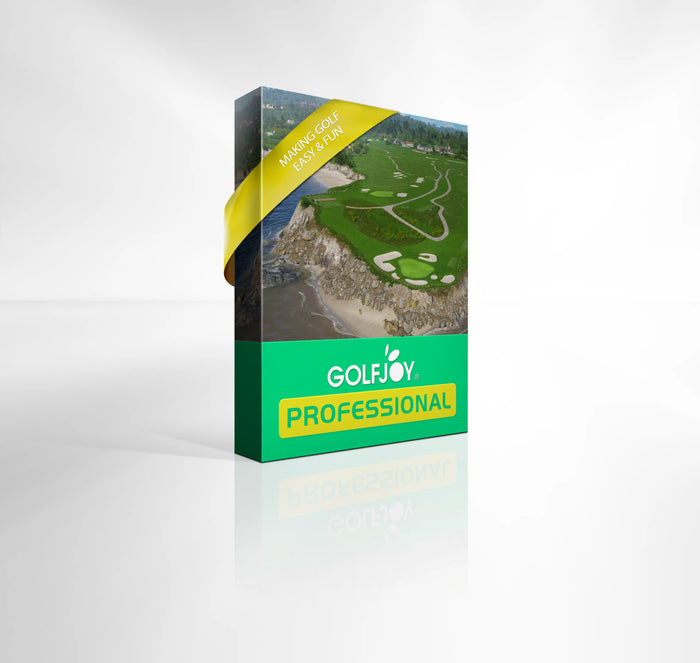
I personally still like GSPro a lot because of its course library, online play, and overall simulator experience. But I also learned that GOLFJOY provides a 3-month free trial of its own simulator software for Spica 3 users.
After setting up the system, I tried the GOLFJOY software and was honestly surprised by how polished it felt. The interface looked clean, the virtual course experience was smooth, and the features were more than enough for normal home practice and casual play.
GOLFJOY’s software is annual subscription-based, with plans around $249/year and $799/year. For most home golfers, the $249/year plan already feels sufficient.
This is one of the most overlooked parts of simulator cost: the purchase price is only part of the equation. The long-term ownership cost often depends on software subscriptions, ecosystem restrictions, and connection fees.
The Cost of an Impact Screen and Enclosure: Around $1,000 to $6,000+
A simulator screen is not just a white screen. It has to handle repeated golf ball impact, reduce bounce-back, display a clear projected image, and last through regular use.
A basic impact screen may cost a few hundred dollars, but once you include a full enclosure, side protection, frame, blackout material, and larger dimensions, the total can easily move into the $1,000 to $6,000+ range.
This was one of the reasons the GOLFJOY P8 package made sense to me. I did not have to separately research screen sizes, enclosure frames, side nets, or compatibility between components.
For $8,199, the P8 already included the simulator structure, impact screen, enclosure, projector, mat, and Spica 3 launch monitor. That made the total cost much easier to understand.
The Cost of a Golf Simulator Projector: Around $400 to $6,000
A projector is technically optional if you only want to hit into a net and view numbers on a tablet or monitor. But if you want the full simulator experience, a projector makes a big difference.
For home simulators, you usually need to consider:
- Short-throw distance
- Brightness
- Resolution
- Input lag
- Mounting position
- Image size and aspect ratio
Basic projectors may start around $400 to $800, while higher-quality simulator projectors often cost $1,000 to $3,000+. Premium 4K projector setups can go even higher.
This is another place where buying components separately can make the project bigger than expected. With the GOLFJOY P8, the projector was already part of the package, so I did not need to spend extra time figuring out projector throw ratio or screen fit.
The Cost of a Golf Hitting Mat: Around $100 to $1,500
The hitting mat is one of those components people underestimate until they actually start hitting balls every day.
A low-quality mat may be fine for occasional use, but if you practice regularly, it can be harsh on your wrists, elbows, and shoulders. Better mats provide more realistic turf interaction and better shock absorption.
Basic mats can start around $100, while higher-quality hitting mats often range from $500 to $1,500.
For serious home practice, this is not the place I would cut corners. A good mat affects both comfort and long-term use. The P8 package including a mat helped reduce one more separate purchase decision.
The Hidden Cost of a Gaming PC: Around $1,000 to $3,000+
This was one of the biggest costs I almost forgot about.
If you want to run simulator software like GSPro at a high visual quality, you may need a capable gaming PC with a dedicated graphics card. Depending on the specs, that can add another $1,000 to $3,000+ to the total setup.
I was lucky because I already had a computer at home that could handle simulator software. I also confirmed before buying that GOLFJOY’s mobile app also could run virtual course play and without subscription fee.
For anyone starting from zero, though, the PC cost should absolutely be included in the budget.
Other Costs People Forget
Once the main components are covered, there are still smaller costs that can add up quickly.
- Floor turf or gym flooring
- Ceiling protection
- Side wall protection
- Extension cables
- Projector mounts
- Lighting
- Club stickers
- Extra golf balls
- Space preparation
None of these may feel major individually, but together they can easily add hundreds or thousands of dollars depending on how finished you want the room to feel.
What a DIY Home Simulator Can Really Cost
If you piece everything together yourself, a realistic home golf simulator cost may look something like this:
- Launch monitor: $2,000 to $7,000
- Impact screen and enclosure: $1,000 to $6,000
- Projector: $500 to $3,000+
- Hitting mat: $300 to $1,500
- Gaming PC: $1,000 to $3,000+
- Software: $0 to $2,000+ per year
- Accessories and setup materials: $300 to $2,000+
That means even a solid home simulator can realistically land somewhere between $8,000 and $15,000 once everything is included.
Higher-end builds can easily go beyond $20,000 depending on launch monitor choice, projector quality, enclosure size, and software ecosystem.
Why the GOLFJOY P8 Package Made Sense to Me
After pricing everything out separately, the GOLFJOY P8 package started to look much more practical.
For $8,199, I was getting a complete simulator package instead of trying to coordinate multiple components from different brands.
The biggest advantages for me were:
- Spica 3 launch monitor included
- Impact screen included
- Enclosure included
- Projector included
- Hitting mat included
- No separate GSPro connection fee
- Mobile app support
- Simple installation workflow
I followed the GOLFJOY installation video on YouTube, had one friend help me, and we finished the setup in under four hours.
That was a big deal for me. I did not want my simulator to become a never-ending home improvement project. I wanted something I could actually use.
What I Would Tell Someone Budgeting for a Home Simulator
If you are trying to figure out how much a golf simulator costs, do not only look at the launch monitor price.
Look at the complete ownership picture:
- What is included?
- What do you still need to buy?
- Does the system require annual software fees?
- Does it charge extra for GSPro connection?
- Do you need a new PC?
- Does it work well indoors?
- How difficult is the setup?
Once I looked at the full picture, the GOLFJOY P8 felt like a more complete and practical route for my home setup.
So, How Much Should You Expect to Spend?
If you only want basic shot feedback, you can spend a few thousand dollars and build a simple net-based practice setup.
If you want a real home golf simulator with a screen, projector, launch monitor, mat, enclosure, and simulator software, a more realistic budget is usually $8,000 to $15,000.
If you want a premium or fully customized simulator room, the cost can move beyond $20,000 quickly.
For me, the GOLFJOY P8 hit the right balance. It was not just about the price of one component. It was the fact that the full system came together cleanly, performed well indoors, and avoided a lot of the extra decisions and hidden costs that often make simulator projects more complicated than expected.
FAQ: Home Golf Simulator Costs
How much does a good home golf simulator cost?
A good home golf simulator usually costs between $8,000 and $15,000 when you include the launch monitor, screen, enclosure, projector, mat, software, and setup accessories.
What is the most expensive part of a golf simulator?
The launch monitor is often the most important and expensive component, but the projector, enclosure, screen, software, and PC can also add significantly to the total cost.https://www.golfjoy.com/
Is it cheaper to build a simulator piece by piece?
It can be, but only if you know exactly what you are buying. Piece-by-piece builds can become more expensive once you add software, connection fees, projector requirements, and accessories.
Do you need a gaming PC for a golf simulator?
For advanced simulator software like GSPro, a capable gaming PC is usually recommended. However, some systems, including GOLFJOY, also offer mobile app-based play options.
Is the GOLFJOY P8 worth considering?
For golfers who want a complete home simulator package without sourcing every component separately, the GOLFJOY P8 is worth considering. It includes the main simulator components and uses the Spica 3 launch monitor, which is designed for strong indoor performance and software flexibility.
https://golfjoy.com/
GOLFJOY
